
Tap for a new line.
Hold to send.
EnterGuard is a menu bar app that changes what the Enter key does on your Mac. ChatGPT, Slack, Discord, Teams, your browser, native apps. Anywhere you can type on a Mac, it works the same way. Accidental sends are over.
Version 1.1 ・ 305KB ・ macOS 13 or later ・ Notarized by Apple ・ Free
One key, two jobs
Nothing to memorize. Tap Enter like you always have to get a new line. Hold it a little longer only when you actually want to send.
New line, or confirm input
Same as before. Repeatedly tapping Enter to confirm text in an IME will never send your message.
Send
The message goes out only when you hold Enter past the threshold. Set it anywhere between 0.2s and 1.0s to match how fast you type.
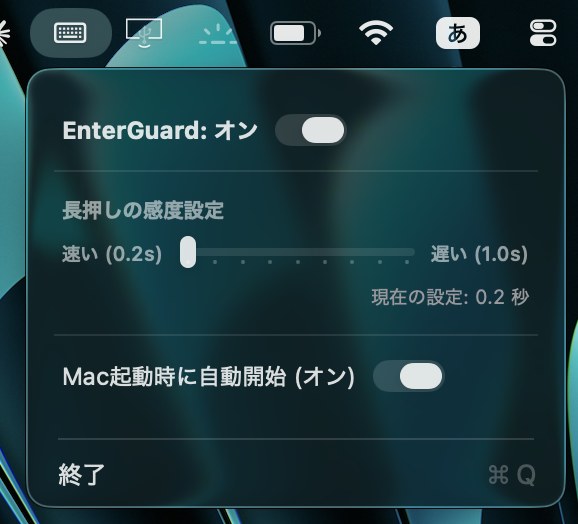
Managed from the menu bar
Toggle it on or off and pick your hold duration here. Need the original Enter behavior back in a terminal or editor? One click turns it off.
Turn on launch-at-login and you never have to think about it again.
Most useful where there's no undo
A brief moment of intent, right before a message leaves your hands.
- AI chatStop sending half-written promptsChatGPT and Claude give worse answers when a prompt goes out mid-thought. Long instructions deserve line breaks.
- Live chat on callsRead it back before it hits Zoom or DiscordNo more unfinished sentences showing up in front of everyone on the call.
- Work messagingChoose your words calmly in Slack or TeamsNo more deleting and re-sending. Just write, then decide.
What it does
- Intel and Apple SiliconRuns on any Mac with macOS 13 Ventura or later.
- Works in every appBrowsers, native apps, Electron apps. Same behavior everywhere.
- Toggle from the menu barSwitch back to the stock Enter key whenever you need it.
- Pick your own hold timeAnywhere from 0.2s to 1.0s, via a slider.
- Nothing leaves your MacAll processing is local. No servers, no network calls.
- 13 languages, automaticallyThe app follows your Mac's language setting.
- 305KB, light enough to forgetSits in your menu bar all day without getting in the way.
Set up in about a minute
Each step, shown on a real screen.
-
Unzip and move to Applications Double-click the downloaded zip to get EnterGuard.app, then drag it into your Applications folder in Finder.
-
Launch it and click "Open System Settings" The first launch asks for Accessibility permission. Click "Open System Settings" and macOS takes you straight to the right page.
-
Turn on the EnterGuard switch Under Privacy & Security → Accessibility, flip the switch next to EnterGuard. macOS may ask for your password.Without this permission the app can't measure how long Enter is held, so it won't work. macOS requires this for any app that handles keyboard input.
-
Set your hold time from the menu bar Click the menu bar icon to open the panel. The slider sets how long to hold; the switch controls launch at login. Default is 0.4s.
13 languages
The interface follows your Mac's language setting automatically.
Questions
Is it safe?
Does it log my keystrokes?
I want to stop Slack or ChatGPT from sending when I press Enter
Can't I just use Shift+Enter for new lines?
Will it change Enter in my terminal or code editor?
Does it interfere with IME text input (Japanese, Chinese, Korean)?
Is there a Windows version?
How was it built?
Make sending a deliberate act.
Free to use. Setup takes about a minute.